
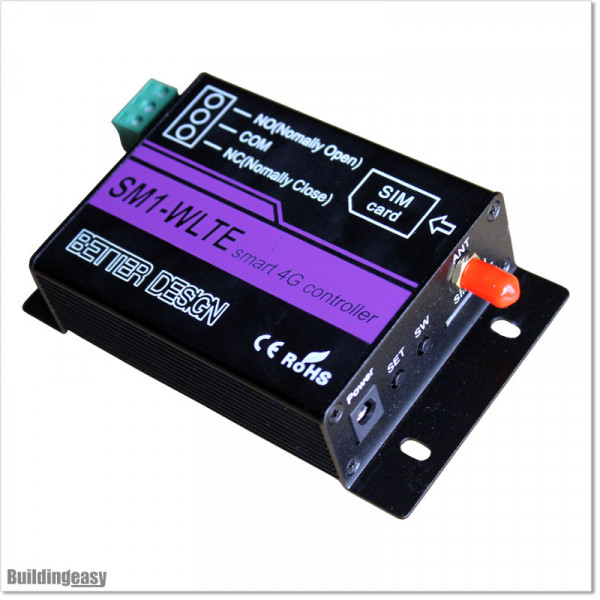
4G Remote APP base GSM Controller can be controlled by SMS Messaging, Simple Calling or APP base 4G Data Modes

4G APP Base GSM Controller (GSM-APP1)

$300.00
Tax included

4G Remote APP base GSM Controller can be controlled by SMS Messaging, Simple Calling or APP base 4G Data Modes

Quantity

Guarantee Safe & Secure Checkout
Product payments

4G Remote GSM Controller can be controlled by SMS Messaging, Simple Calling or APP base 4G Data Modes. This can set to give Momentary(Trigger) output to open the gate or ON/OFF mode control equipment remotely. The 4G switch controller support wide applications, such as access control system, pump motor controlling, smart light etc.

Download WLTE App free from app store. Set up with password.

Features:
  • Remote Control, no distance limitation
  • Free Call and SMS control
  • 4G Data network Remote Control Via App
  • Relay output (10A/30VDC, 10A/250VAC)
  • Scheduled/Timing Control
  • Industrial class design, Aluminum alloy material
Specifications: 
  • DC power supply: standard adapter DC12V/500mA or 1A, Range 9 to 12V.
  • SIM Interface: for SIM Card
  • External Antenna: SMA Antenna interface
  • Relay Outputs: 1 Channel 10A/30VDC or 10A/230VAC
  • Output logic: normal open and normal close.
  • AU / NZ version 4G frequency: B1 B2 B3 B4 B5 B7 B8 B28 B66
SMART REMOTE GMS/LTE CONTROLLER SETUP

Initial Configuration
  • Insert Sim Card and Fix the Antenna given in the box to the module.

  • Now Power up the Module using the powerpack given in the box.

  • Now See whether the SIG led is blinking or not. If it is blinking, The module is connected to the SIM network (Please Read the given Manual for further instructions)

  • Default password of the system is “0000”

  • Save the SIM number on your mobile.

  • To use dial functions, you need to add a master number for the module. To do that, Press the “SET” button once and Call the Module SIM number using your phone within 30 Secs. 
How to send a pulse command (for Automatic Gate Openers)

For An example if you want a 1 sec delay, you can send below SMS to the SIM to configure

SN0000L010001

Watch Unboxing and Set-up video here

GSM-APP1
7 Items
New
THEME OPTIONS

Panel Tool

Full Width Boxed Large
Yes No
Font Base
Font Heading
Font Slider
Font Senary
Font Septenary
Color Default
Headings Color
Link Color
Link Hover Color
Text Color
Price Color
Button Background
Button Hover Background
Button Color
Button Hover Color
Product Background
Product Name Color
Product Name Hover Color
Product Price Color
Product Regular Price Color
Product Button Background
Product Button Hover Background
Product Button Color
Product Button Hover Color
On Sale Badge Background
On Sale Badge Color
New Badge Background
New Badge Color
Sale Badge Background
Sale Badge Color
Online Only Background
Online Only Color
Pack Badge Background
Pack Badge Color
Block Background
Block Inner Background
Block Heading Background
Block Heading Color